

Configuration and runtime
Workers, runtime, and remote Runners
Complete guide to the 4 groups and 10 sections of workspace Worker settings: roster & dispatch templates, Planner / Titler, local Pi solo mode, minimum CLI versions, container quotas & OCI runtimes, HTTPS remote Runners, and Pi + Ollama setup.
On this page
- 1. The 4 workspace setting groups (10 sections)
- Group 1 — Dispatch setup (required for swarm mode)
- Group 2 — Agent and runtime
- Group 3 — Execution and scheduling
- Group 4 — Data management
- 2. Supported engines and Pi + Ollama local setup
- Pi + Ollama example
- 3. Execution mode matrix
- 4. Independent & HTTPS remote Runner nodes
- 5. Troubleshooting
Before dispatching a task in CTF or Pentest, configure the corresponding workspace under Worker settings (/ctf/workers for CTF, /pentest/workers for Pentest). Global engine credentials configured under Settings → Agents and providers are shared automatically, while seats, runtime targets, and budgets are saved per workspace.
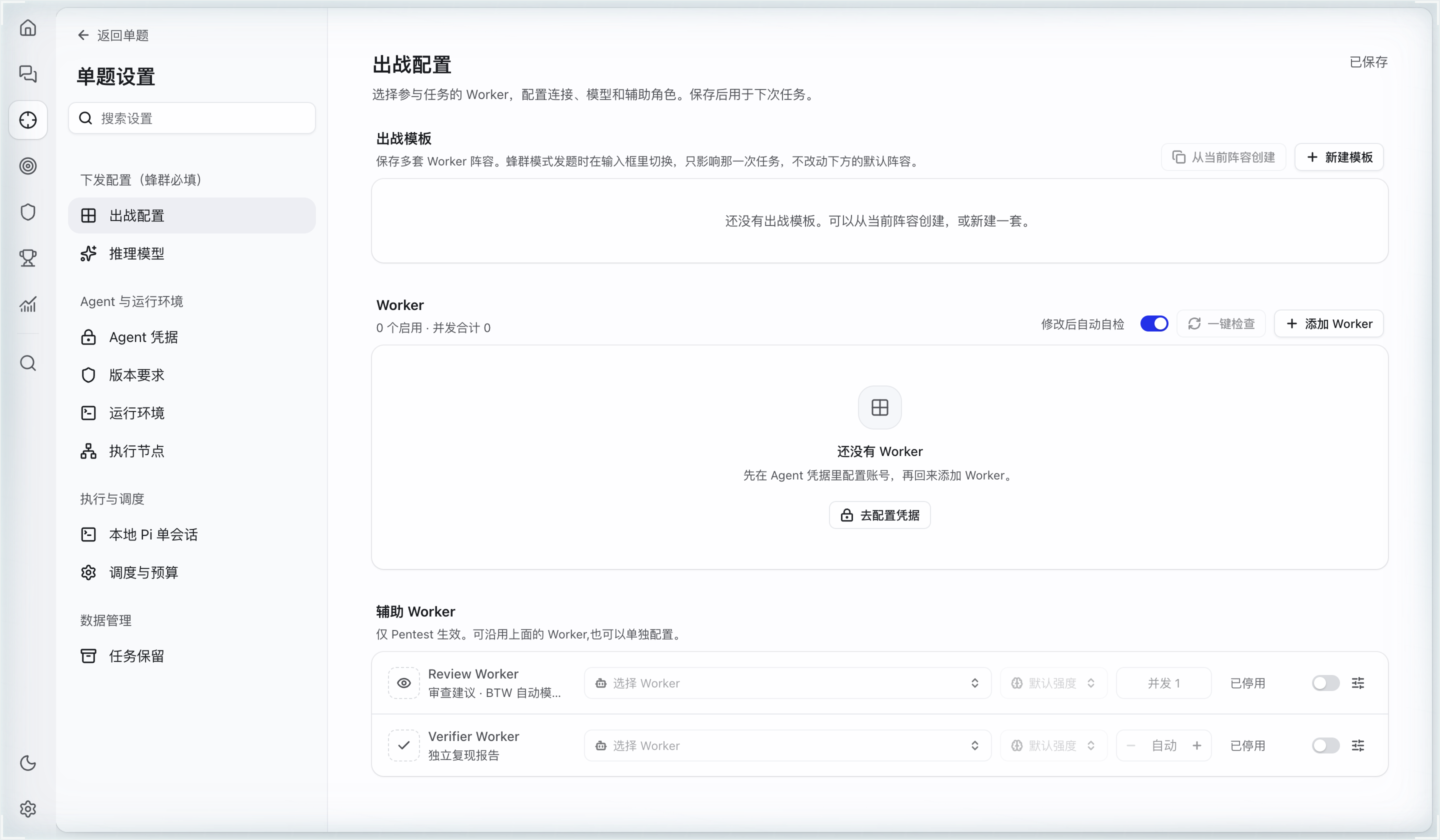
1. The 4 workspace setting groups (10 sections)#
Group 1 — Dispatch setup (required for swarm mode)#
- Roster (
?section=roster):- Worker seats: Add one or more Worker seats, assign each an engine, injectable/host credential, model, reasoning effort, and per-seat concurrency cap. Auto self-check verifies connectivity when seat settings change.
- Dispatch templates: Save reusable lineups (such as a multi-engine Web swarm or a pure Muteki-Pi roster) and switch between them directly from the task composer.
- Auxiliary policies (Reviewer & Verifier): Optionally enable dedicated Reviewer (triage / course correction) and Verifier seats with custom engines, timeouts, trigger thresholds, and concurrency caps.
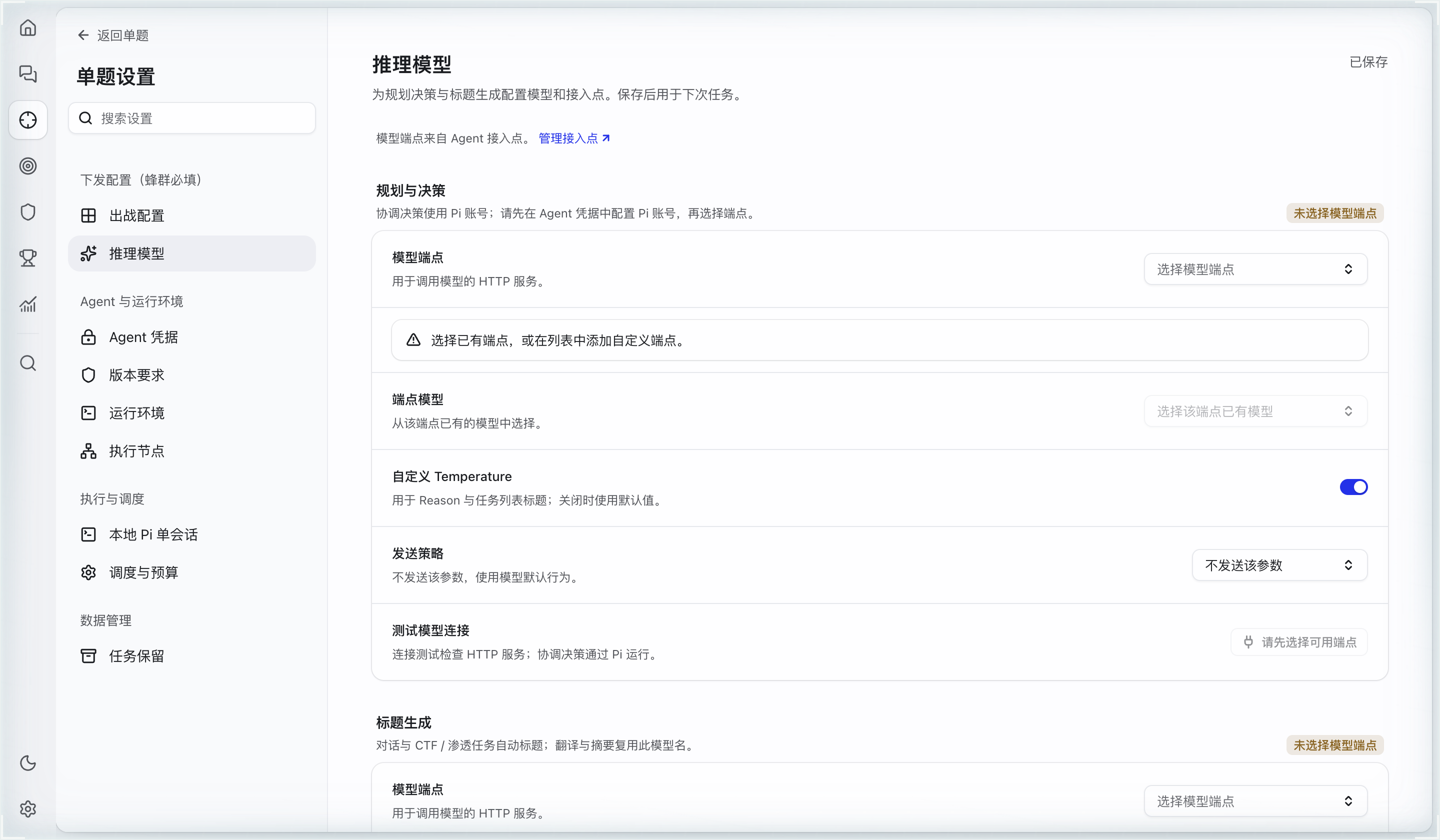
- Reasoning models (
?section=models):- Bind model endpoints, model IDs, and temperature policies separately for the Planner and Titler, and run real connection tests.
Group 2 — Agent and runtime#
- Agent credentials (
?section=credentials):- Manage credentials directly inside Worker settings. While local execution can inherit host CLI logins, container execution and remote Runner nodes require injectable credentials (API keys, tokens, or custom endpoints).
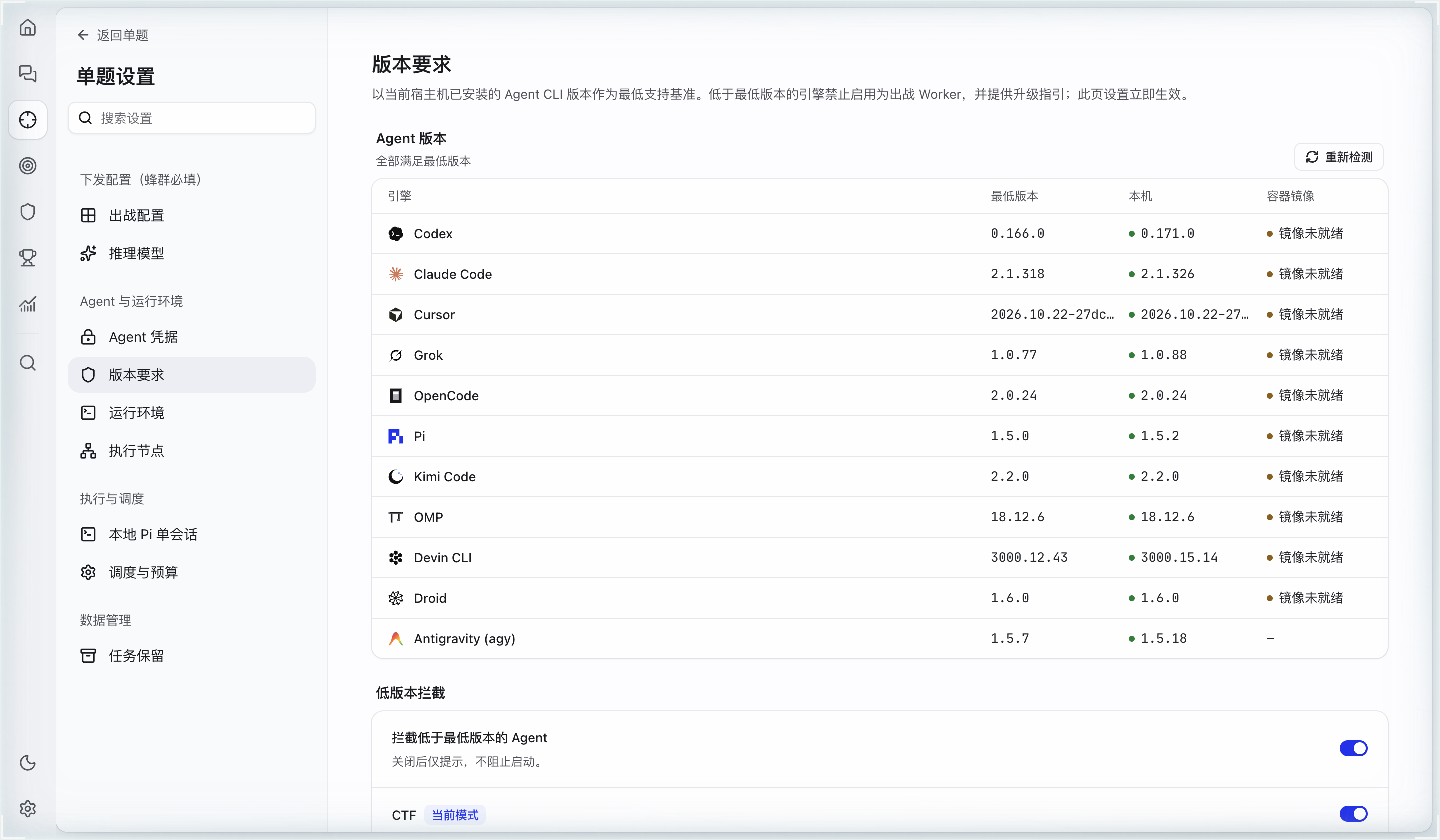
- Version policy (
?section=versions):- Displays the embedded baseline from
minimum_versions.jsonalongside detected host CLI versions and Worker container image CLI versions. - When enforcement is enabled, engines below the minimum baseline cannot be enabled as Worker seats; copyable upgrade commands are provided inline.
- Displays the embedded baseline from
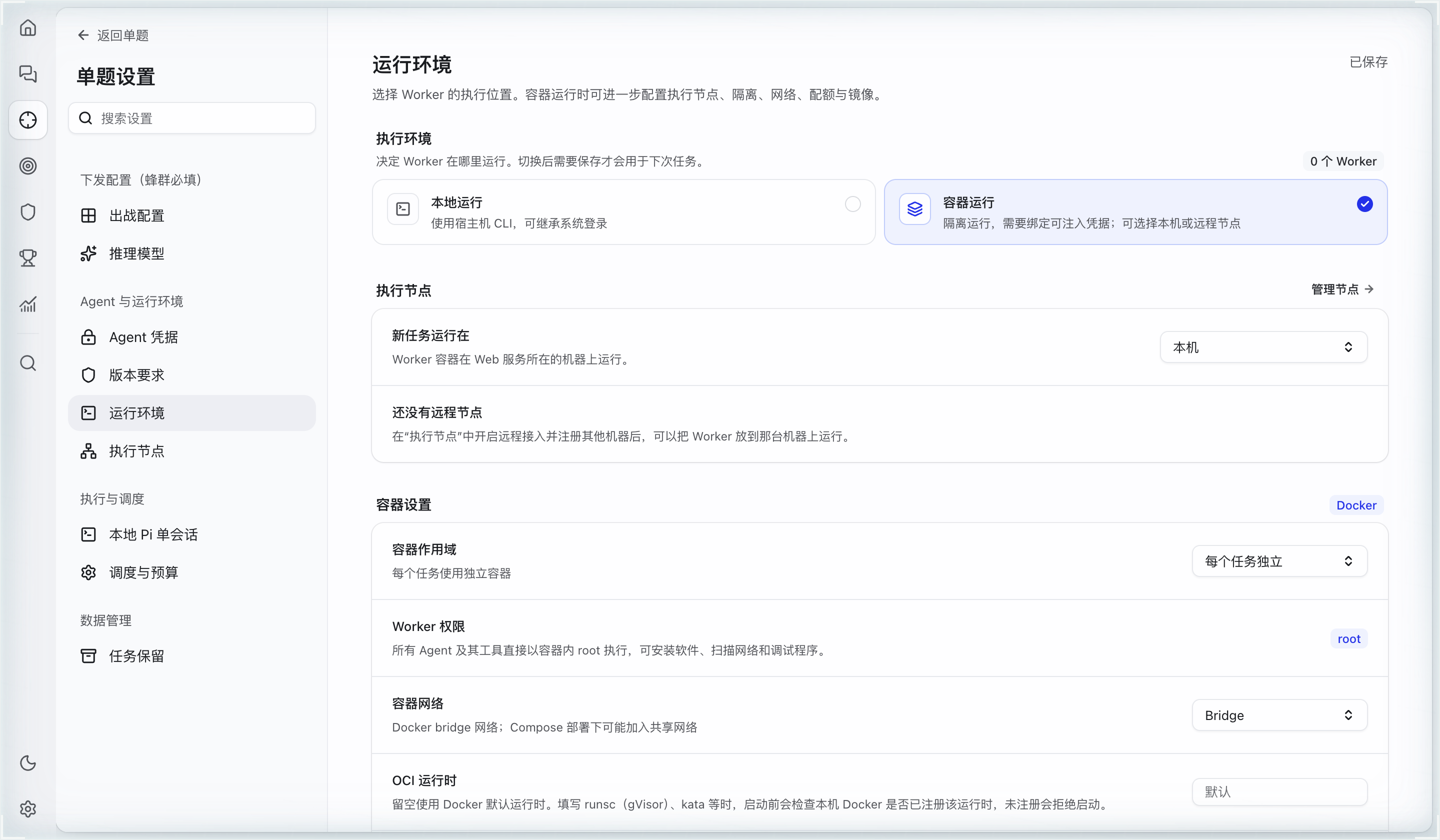
- Runtime (
?section=runtime):- Execution backend: Choose Local (host CLI) or Container (Docker isolation; locked to Container inside Docker Compose deployments).
- Container scope: Per-run isolated container or Shared container across mutually trusted runs (note that Workers sharing a container share filesystem access and injected credentials).
- Worker privileges & network: Container Workers execute as container
root(--user 0:0), with selectable Bridge or Host networking. - Custom OCI runtime: Leave blank for Docker default, or enter an alternative runtime such as
runsc(gVisor) orkata(checked against the target node's Docker daemon before launch). - 5 container resource quotas: Memory limit (e.g.
4g), CPU limit (fractional supported, e.g.1.5), PIDs limit (1024), per-command output cap (64m), and workspace disk quota (8g). - Image status & capabilities: Inspect Docker health, pulled image presence, version match, embedded 9 CLI capabilities, and trigger image pulls.
- Execution nodes (
?section=nodes):- Select Local or a registered HTTPS remote Runner node for container execution.
Group 3 — Execution and scheduling#
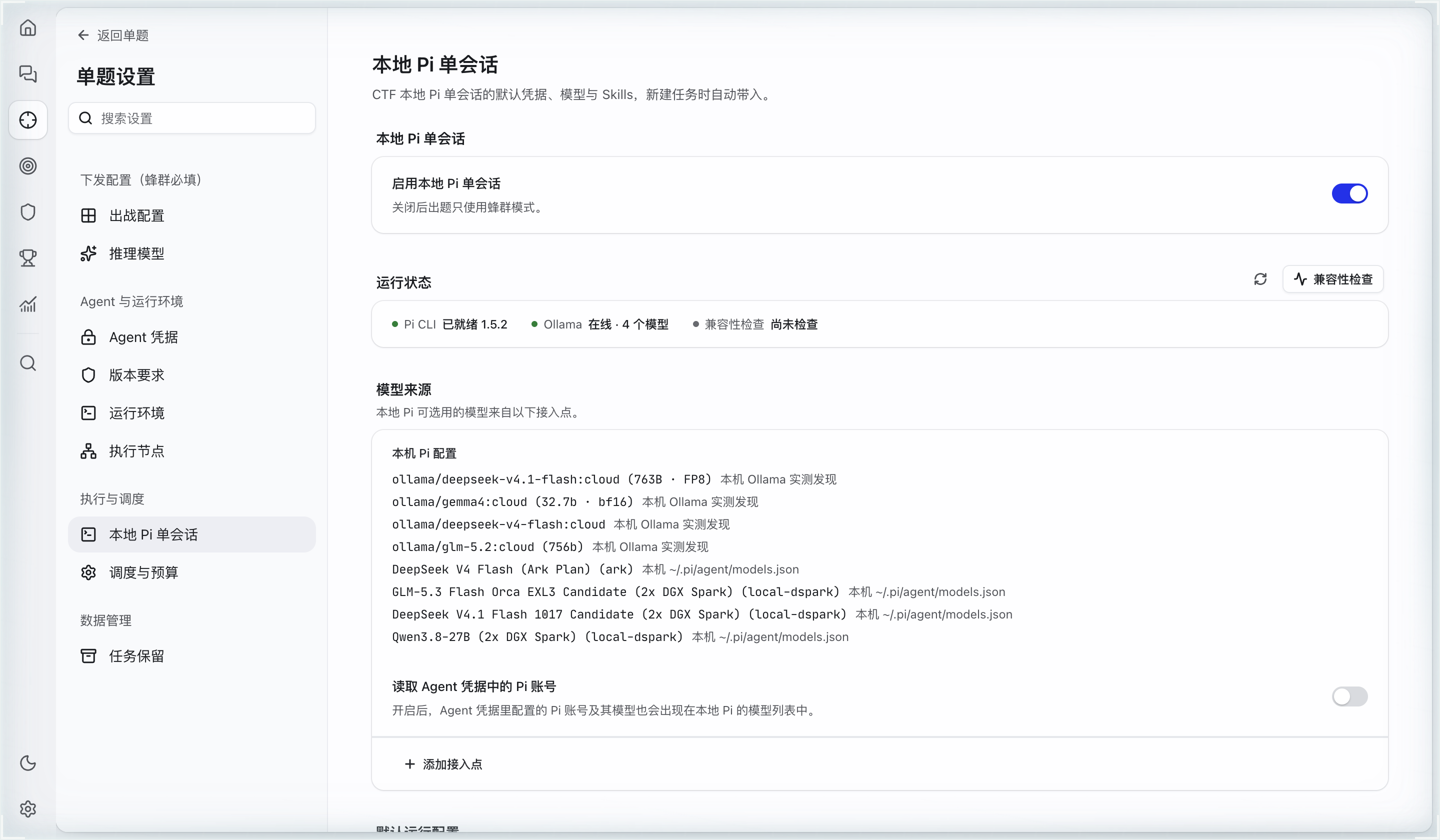
- Local Pi solo session (
?section=local_pi, CTF only):- Powers the Solo mode on
/ctf: runs a single direct Pi session without needing a swarm Planner, ideal for fast single challenges or local Ollama models. - Runtime probe: Shows
piCLI and Ollama readiness plus a 5-part Compatibility check (text response, streaming deltas, tool call representation, token usage reporting, and context window metadata). - Model sources: Reads local Pi config, optionally pulls Pi accounts from Agent credentials, and lets you add OpenAI-compatible or Anthropic endpoints and fetch/add model IDs inline.
- Defaults & CTF skills: Pick default model, local Ollama endpoint, execution permissions (
full-access/auto-accept-edits/supervised),PI_OFFLINE=1startup flag, and toggle the 5 built-in CTF skills. - Isolation note: Local Pi solo runs launch with
--no-skills --no-extensions --no-mcp; skills enabled for Pi/CTF under Settings → Agent extensions are projected read-only into.pi/skills/and loaded via--skill.
- Powers the Solo mode on
- Execution guardrails (
?section=guardrail, Pentest only):- Configures Cronus-9B real-time risk evaluation and human approval thresholds for Pentest Production Protection Mode. See Pentest.
- Scheduling & budgets (
?section=scheduling):- Set default wall-clock budget, max total Workers, USD cost cap, and node concurrency caps (excess runs queue cleanly; pausing a process does not immediately release its memory).
Group 4 — Data management#
- Task retention (
?section=retention):- Configure automatic archiving (default
15days) and automatic deletion of archived tasks (default30days). See Data, usage, and operations.
- Configure automatic archiving (default
2. Supported engines and Pi + Ollama local setup#
The curated Worker container image pins 9 CLI engines in docker/worker-common/engines.json: Claude Code, Codex, Cursor, Pi, OMP, Kimi, Grok, OpenCode, and Droid. Host-local setups additionally support Devin and Antigravity (agy).
Pi + Ollama example#
- Under Local Pi solo session → Model sources or Settings → Agents and providers, add an OpenAI-compatible endpoint matching your execution target:
- Host CLI:
http://127.0.0.1:11434/v1 - Local Docker container:
http://host.docker.internal:11434/v1 - Remote Runner node: use an address reachable from that remote host (
localhostresolves to the remote node itself, not the Web server)
- Host CLI:
- Fetch or add the Ollama model ID and run Test or Compatibility check to confirm tool calling and streaming work.
- For Solo runs on
/ctf, select the model directly in the composer; for Swarm runs, bind it to a Worker seat and ensure the Planner is configured and tested.
3. Execution mode matrix#
| Setup | Where app & Workers run | Notes |
|---|---|---|
| macOS local | Desktop or Web + host CLI Workers | Verified on Apple Silicon; install CLIs and host tools as needed |
| macOS + Docker Desktop | Host app + Linux Worker containers | Requires muteki-worker image and injectable credentials |
| Linux Web / Compose | Web + independent Docker Runner | Native Linux Web packages and multi-arch official images |
| Windows | WSL2 or Linux host (Web / Compose) | No native Windows desktop build |
4. Independent & HTTPS remote Runner nodes#
In Compose or multi-host setups, Web handles orchestration, persistence, and UI while Runner manages Docker containers and Worker processes.
-
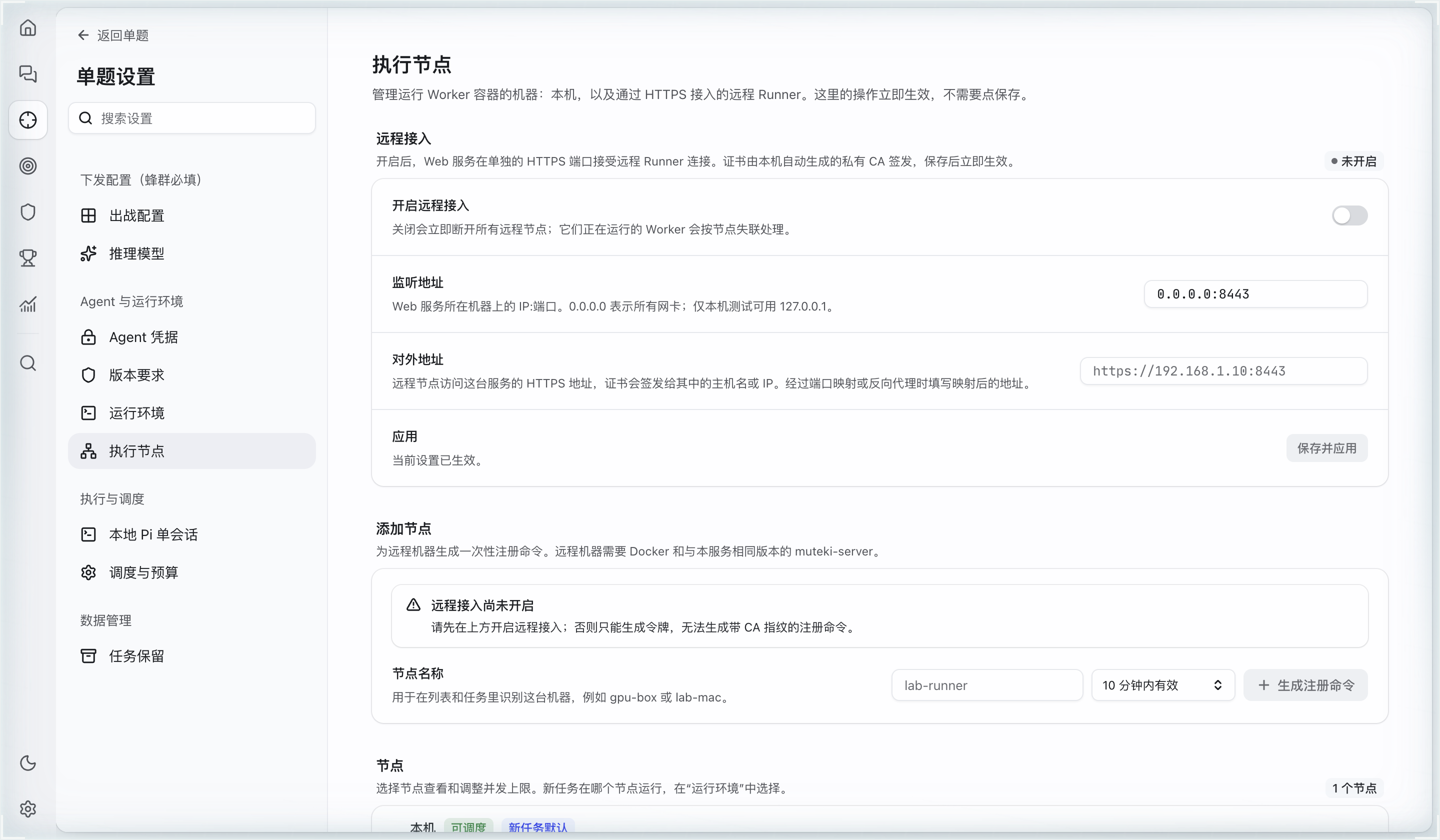
Enable remote listener: Under Worker settings → Execution nodes, configure the listen bind address (e.g.
0.0.0.0:7443) and reachable public HTTPS URL (e.g.https://203.0.113.10:7443) and save. Muteki automatically generates a private CA and server certificate and displays the CA SHA-256 fingerprint andca.pemdownload (read-only if pinned via CLI--runner-tls-*flags). -
Issue a one-time enrollment command: Enter a node name and TTL (up to 15 minutes) to generate a single-display token enrollment command.
-
Enroll and start on the remote host (requires Docker and matching
muteki-serverversion):Shell printf '%s' '<token>' | muteki-server runner enroll --state-dir "$HOME/.muteki-runner" \ --server https://203.0.113.10:7443 --ca-sha256 <fingerprint> --token-file /dev/stdin muteki-server runner --remote --state-dir "$HOME/.muteki-runner"Set
HTTPS_PROXY=http://proxy:portif the remote node connects via an HTTP CONNECT proxy (NO_PROXYis respected), and inspect identity/expiry viamuteki-server runner status --state-dir .... -
Node operations: Once online, select the node under Runtime → Execution node (remote nodes only run container Workers). You can adjust per-node concurrency, Drain (finish active work without taking new runs), Resume, rotate credentials (
runner install-credential), Revoke (re-enrolling requires--replace), or delete nodes.
5. Troubleshooting#
| Symptom | Check first |
|---|---|
| UI will not open | Terminal-printed URL/port, paired MUTEKI_WEB_TLS_CERT / KEY paths if TLS is enabled, and server/frontend logs |
| No available Worker / seat blocked | CLI version meets Version policy, credential passes Test, seat is enabled with a valid model |
| Container run fails to start | Docker daemon status, muteki-worker image pulled/built, injectable credential bound (not host-only login), OCI runtime registered |
| Planner test fails | Planner endpoint, model name, API key, and proxy settings under Reasoning models |
| Chat / Competitions missing in Web mode | Turn on Show chat and competition workspaces under Settings → Appearance → Interface |
| Proxy not taking effect in Docker | Run Verify proxy under Settings → Network proxy; when Web itself is in Docker, use host/LAN IP instead of 127.0.0.1 |
Linux Web package missing .so | Install C++ runtime (sudo apt-get install libstdc++6 on Ubuntu 24.04) and inspect with ldd bin/muteki-server |
| macOS blocks first launch | Release is signed but not notarized; click Open Anyway in System Settings → Privacy & Security |
| Wrong Flag or multi-flag never finishes | Check custom Flag wrapper hints and expected flag count in Advanced settings, or set tighter run budgets / stop manually |