Configuration and runtime
Configuration guide
Complete reference for Muteki's 4 settings groups and 18 pages, covering all 11 CLI engines, model pricing, 3-leg outbound proxy verification, access passwords, appearance, and code hosts.
On this page
- 1. Settings catalog overview (4 groups)
- 2. Agents and providers (/settings/agents)
- Supported 11 engines
- Setup steps
- Model pricing and usage providers
- 3. Global network proxy (/settings/network-proxy)
- 4. Access and sign-in (/settings/access)
- 5. Appearance, chat preferences, notifications, and shortcuts
- Appearance (/settings/appearance)
- Chat preferences (/settings/chat)
- Notifications & Shortcuts (/settings/notifications, /settings/shortcuts)
- 6. Source control hosts (/settings/source-control)
Muteki splits configuration across two entry points:
- Global settings center (
/settings, bottom-left gear icon): manages engines and credentials, global outbound proxy, access password, extensions, appearance, and operations. - Workspace Worker settings (
/ctf/workersand/pentest/workers): per-workbench Worker roster, Planner, local Pi solo mode, containers, and budgets. See Workers, runtime, and remote Runners.
1. Settings catalog overview (4 groups)#
Settings are scoped to Service configuration (stored on the connected Rust service), Shared preferences on this service (synced across clients), or Settings on this device (local browser/app only):
| Group | Page | Route | What it controls |
|---|---|---|---|
| General | Appearance | /settings/appearance | Language, light/dark/system theme, accent color, fonts, engine icon style, workspace visibility toggle |
| General | Chat | /settings/chat | Send key, running message queue/steer, auto-continue on quota reset, Diff layout, thread settlement |
| General | Notifications | /settings/notifications | Alert style, system notification permission, sound toggle, and quiet hours |
| General | Keyboard shortcuts | /settings/shortcuts | Browse all shortcuts and rebind common actions (⌘/⌥ on macOS, Ctrl/Alt elsewhere) |
| Agent | Agents and providers | /settings/agents | Engine probing for 11 engines, host login and custom credentials, default model, pricing, and Cursor usage |
| Agent | Agent extensions | /settings/agent-extensions | Install and assign Skills, plugin packages, and external MCP servers across Chat / CTF / Pentest |
| Agent | Built-in capabilities | /settings/capabilities | Manage built-in browser, desktop computer use, muteki-platform progressive bridge, and Worker skills |
| Agent | Control | /settings/control | muteki-collab master switch, delegated sub-agent execution access/approvals, and audit logs |
| Agent | Orchestration | /settings/orchestration | Multi-agent presets, role-to-model roster, SRC override, and main-session prompt injection preview |
| Agent | Source control | /settings/source-control | Connect GitHub, GitLab, Forgejo, Gitea, Bitbucket, and Azure DevOps accounts and access tokens |
| Data | Archives | /settings/archives | Search, inspect, and restore archived conversations (restoring does not resume execution) |
| Data | Import history | /settings/import | Read-only import of existing Claude Code or Codex conversation history from the service host |
| System | Access and sign-in | /settings/access | Service access password, MUTEKI_WEB_PASSWORD precedence, and active sessions |
| System | Network proxy | /settings/network-proxy | App-wide outbound proxy mode, credentials, no_proxy bypass rules, and 3-leg exit verification |
| System | Platform extensions | /settings/extensions | Install, upgrade, and roll back Agent Plugins 1.0.0 platform modules |
| System | Updates | /settings/update | Inspect installed version, check for releases, and apply updates |
| System | Operations | /settings/operations | Metrics, receipts, recovery preview, built-in domain module status & retry, and maintenance cleanup |
| System | Desktop and connection | /settings/desktop | macOS Desktop only: connected service URL and native host capability checks |
2. Agents and providers (/settings/agents)#
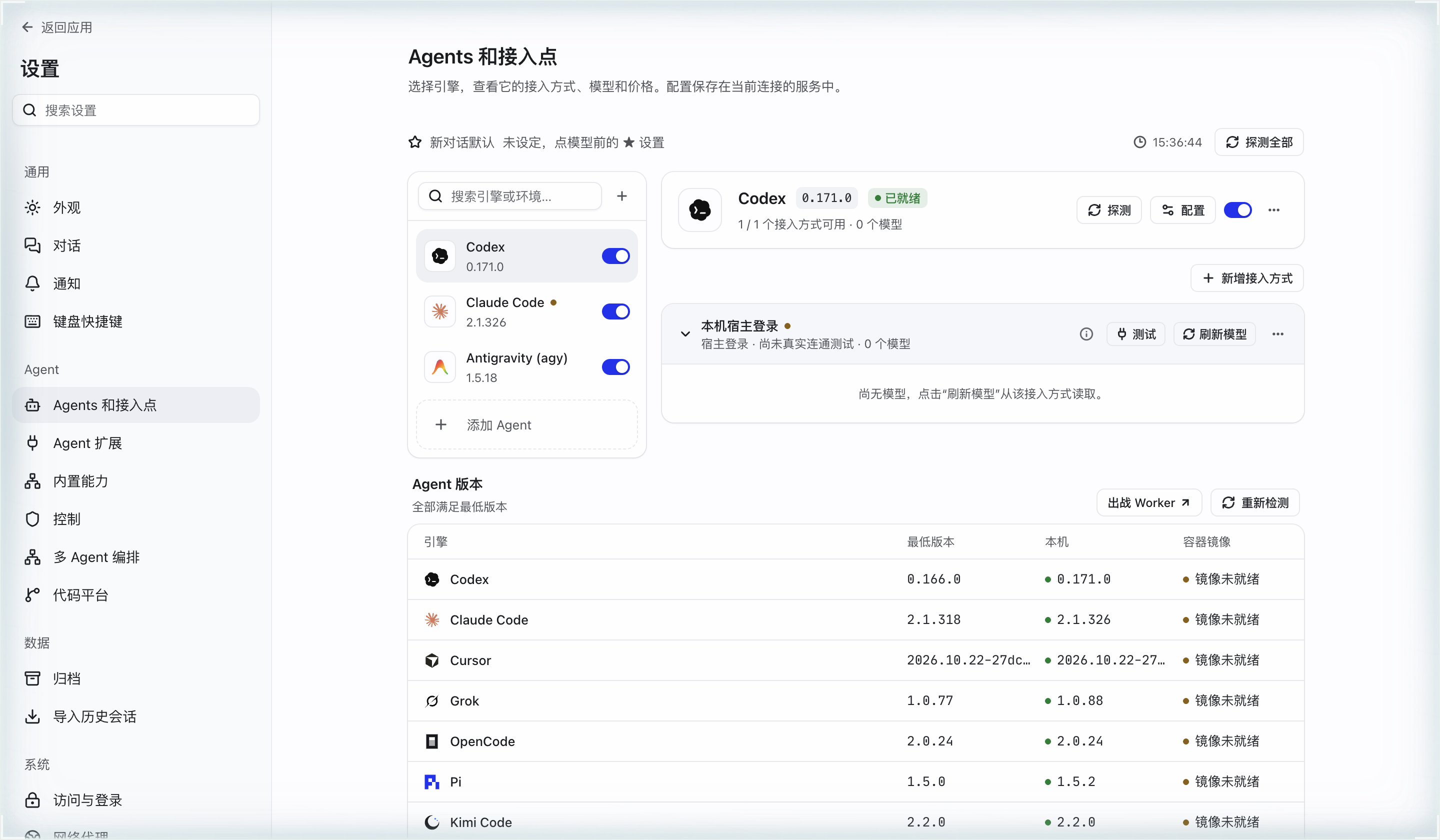
Configure at least one verified engine credential here before running tasks or chats.
Supported 11 engines#
| Engine | Scope | Primary transports | Notes |
|---|---|---|---|
Claude Code (claude) | Host + Worker container | claude.sdk / cli.claude | Official login and Anthropic-compatible endpoints |
Codex (codex) | Host + Worker container | codex.app_server / cli.codex | Supports automatic sidebar folder grouping in the Codex app |
Cursor (cursor) | Host + Worker container | cursor.sdk / cursor.acp / cli.cursor | Supports reading Cursor account quota via macOS Keychain |
Pi (pi) | Host + Worker container | pi.rpc / cli.pi | Built-in open-source core; supports Ollama and OpenAI/Anthropic endpoints |
OMP (omp) | Host + Worker container | omp.acp / omp.rpc_v2 / cli.omp | Custom model endpoint support |
Kimi Code (kimi) | Host + Worker container | kimi.acp / kimi.local_server / cli.kimi | Multi-node compatible |
Grok (grok) | Host + Worker container | grok.acp / cli.grok | Preinstalled with offline bridge support in Worker containers |
OpenCode (opencode) | Host + Worker container | opencode.server / cli.opencode | Multiple model endpoint configurations |
Droid (droid) | Host + Worker container | droid.rpc / droid.acp / cli.droid | Factory credentials and container injection |
Devin (devin) | Host only | devin.acp / cli.devin | Uses host devin auth login; not included in the Worker container image |
Antigravity (agy) | Host only | agy.acp + native StreamAgentStateUpdates | Uses host agy acp --login for chat with native idle-state tracking |
Setup steps#
- Probe installed engines: Click Probe all in the top-right to scan host CLIs and versions; engines below the minimum supported baseline are flagged.
- Add access methods: Select an engine on the left and use its detected Host login (fastest for local runs) or click + Add access method to configure an official API key / token or custom Base URL (container Workers require injectable credentials).
- Test and refresh models: Click Test on a credential (runs a minimal real request) and Refresh models to populate available models.
- Default model and visibility: Star a model to make it the global Default model for new chats, or toggle visibility to hide unused models from pickers.
Model pricing and usage providers#
- Model pricing: Muteki estimates token cost against a public model-pricing catalog (cached for 24 hours). Under the pricing footer you can map aliases or set custom per-million-token rates (USD / MTok). Known zero-cost and unknown prices are tracked separately without fabricating numbers.
- Cursor account usage: On macOS, authorize Keychain access here to surface Cursor subscription quota windows in the Usage dashboard.
3. Global network proxy (/settings/network-proxy)#
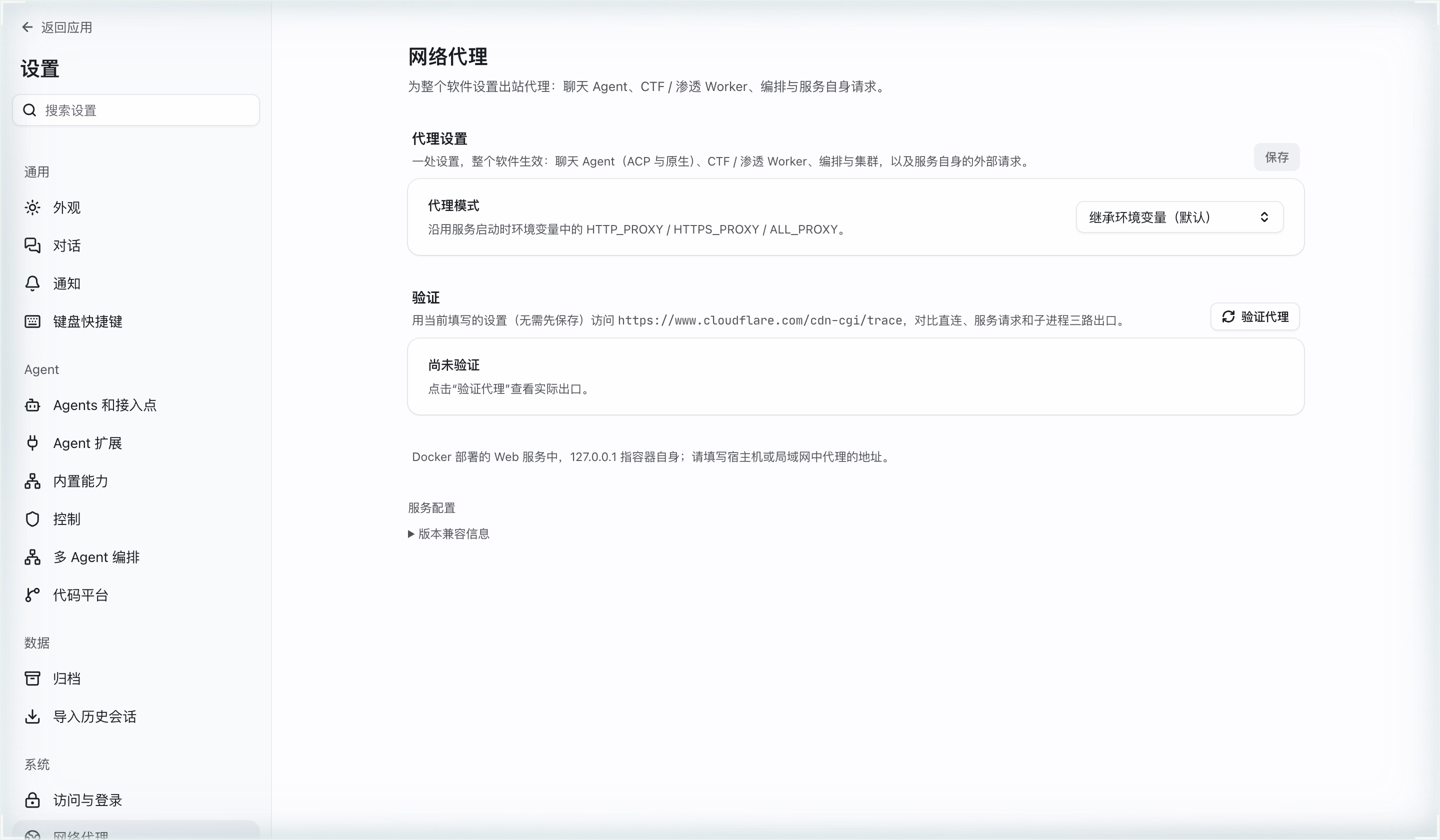
One setting governs all outbound traffic across the app: chat Agents (ACP and native), CTF and pentest Workers, multi-agent orchestration, and Muteki service requests (model tests, Planner, and competition APIs).
- Proxy modes:
- Inherit environment (default): respects
HTTP_PROXY/HTTPS_PROXY/ALL_PROXYfrom the process environment at startup. - Direct (no proxy): ignores environment proxy variables and connects directly.
- Custom proxy: accepts
http://,https://,socks5://, andsocks5h://URLs plus optional username/password (passwords are stored privately on the service and redacted from logs).
- Inherit environment (default): respects
- Container address mapping: When running local Docker containers,
127.0.0.1andlocalhostare automatically rewritten tohost.docker.internalinside Worker containers. When the Muteki Web service itself runs inside Docker, enter the host or LAN IP of your proxy rather than127.0.0.1. - Bypass list (
no_proxy): Comma-separated domains, IPs, or CIDRs; private networks are bypassed by default when empty, and loopback addresses always connect directly. - Verify proxy before saving: Click Verify proxy to test the current form values across three paths simultaneously — Direct exit, Service requests, and Agent & tool child process (
curl) — reporting whether exits match, differ, or confirm proxy routing.
4. Access and sign-in (/settings/access)#
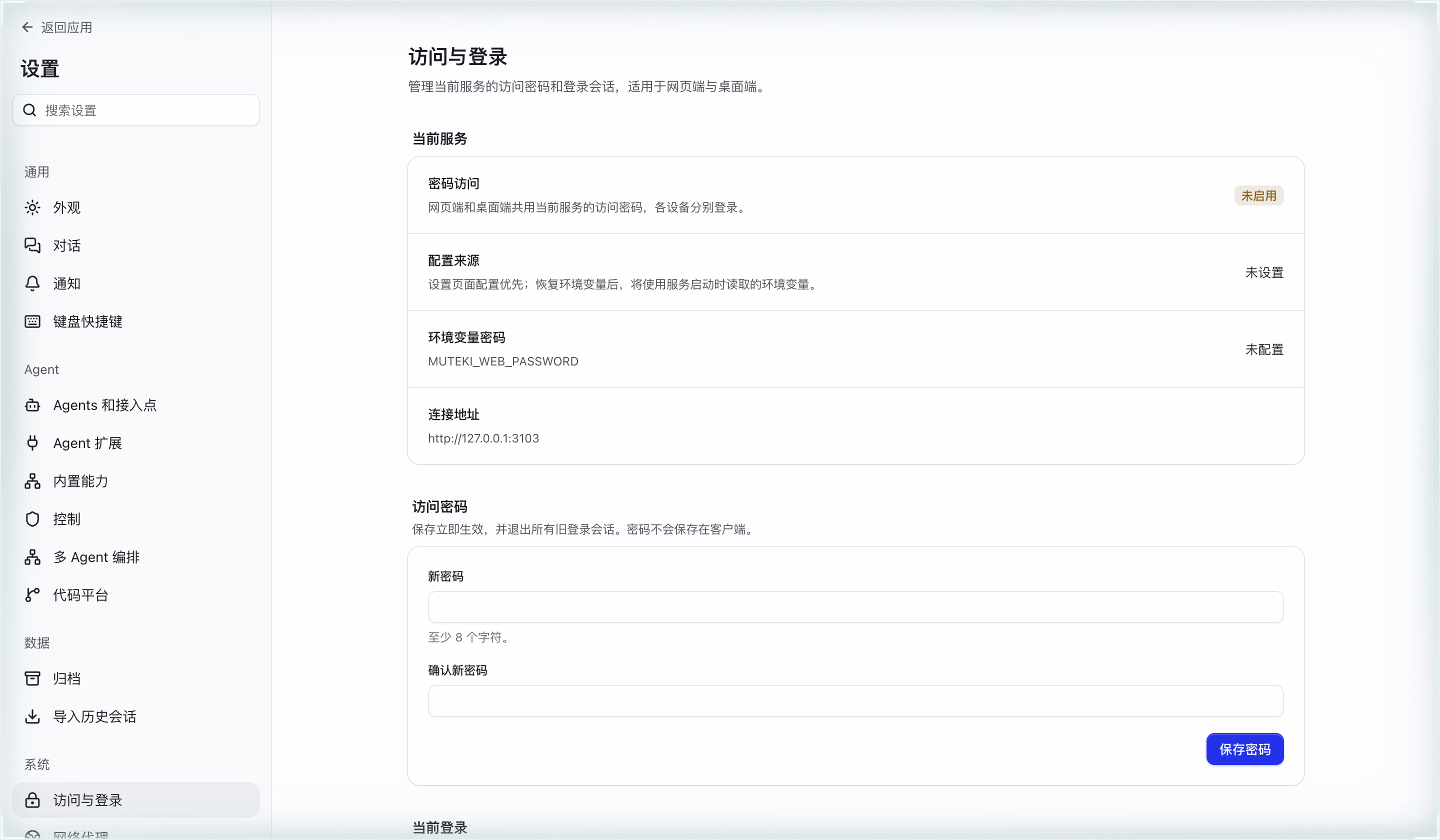
- Service password: Exposing Web mode on a non-loopback address such as
0.0.0.0requires an access password. You can set or rotate it here for both Web and Desktop clients; the Rust backend API itself always remains bound to loopback. - Environment precedence: Passing
MUTEKI_WEB_PASSWORDtakes precedence over the UI-stored password. This page shows the active source, current connection URL, and active session sign-out controls.
5. Appearance, chat preferences, notifications, and shortcuts#
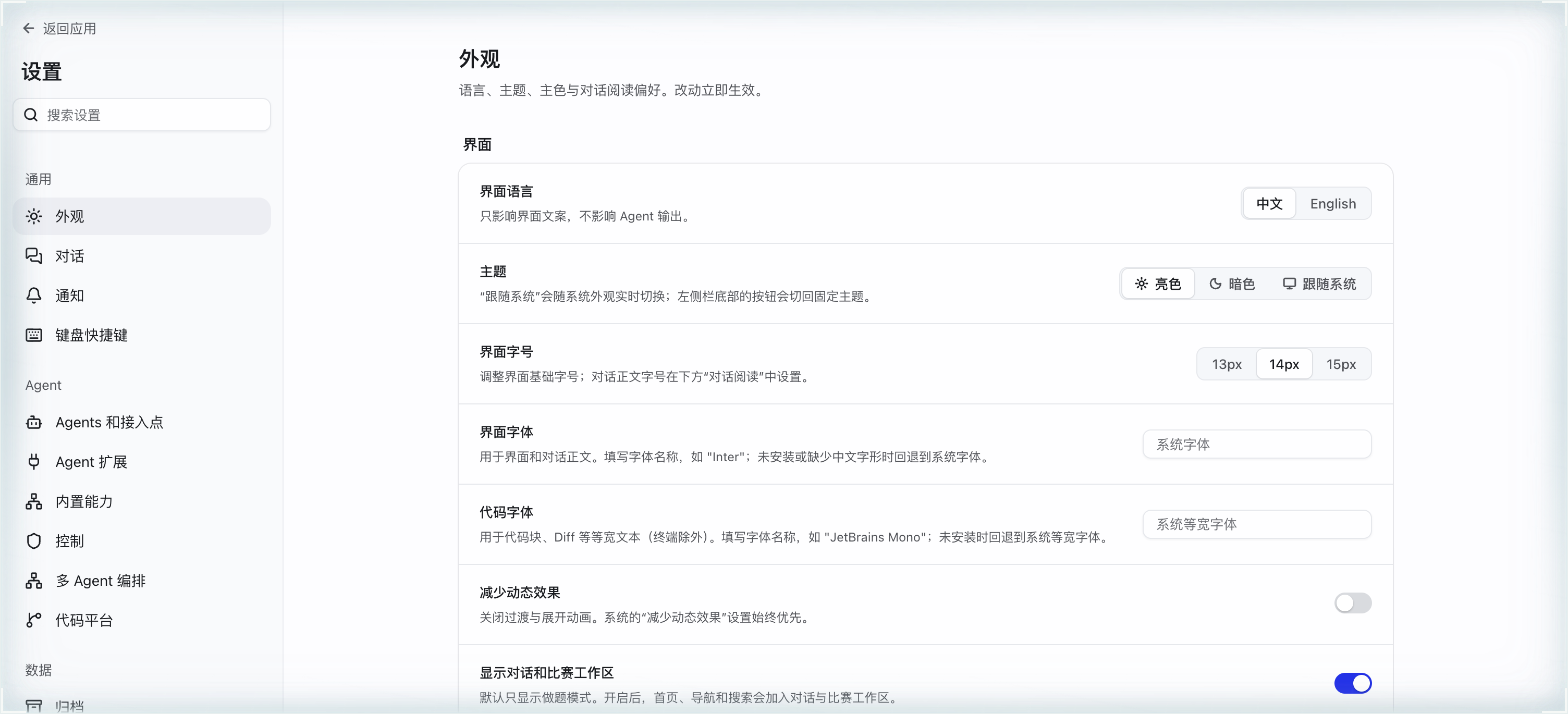
Appearance (/settings/appearance)#
- Language & theme: Switch UI language (
中文/English), theme (Light/Dark/System), and accent color across 4 presets (Azure, Violet, Teal, Ember) or a custom hue/HEX picker. - Typography & layout: Customize UI font size (13–15px), UI/code font families, reduce motion, reading text size, content width (
Narrow/Default/Wide), and compact density. - Engine marks: Choose Brand, Mono, or Custom color for engine logos and toggle model icons in the sidebar.
- Workspace visibility: Enable Show chat and competition workspaces in Web mode to add Chat, Competitions, and the full home overview to navigation.
Chat preferences (/settings/chat)#
- Configure the send key (
Entervs⌘/Ctrl + Enter), default behavior when sending while a run is active (QueuevsSteer), Continue after quota reset, default permission mode (Supervised/Auto accept edits/Full access), external editor integration (VS Code / Cursor / Zed), Diff layout (Unified/Split, wrap, collapse unchanged), command panel/throttling options, and automatic idle Thread settlement days (with per-project overrides).
Notifications & Shortcuts (/settings/notifications, /settings/shortcuts)#
- Test OS notification permissions, toggle sounds, set Quiet hours, and browse or rebind any keyboard shortcut with conflict detection.
6. Source control hosts (/settings/source-control)#
When using the Chat workspace with repositories and Pull Requests, connect code host accounts and personal access tokens under Settings → Source control across GitHub, GitLab, Forgejo, Gitea, Bitbucket, and Azure DevOps (including self-hosted instances).